
Connect docs · Windsurf (Devin Desktop)
Connect 3V3 to Windsurf, now Devin Desktop
One address, https://mcp.3v3.dev, then sign in to 3V3 and press Allow. No key to copy.
Steps
- In the agent panel open the … (Actions) menu at the top right, then MCPs, and open the MCP config from there. (The two Devin pages above name different paths for the file, so let the panel open the right one.) Add:
{ "mcpServers": { "v3": { "serverUrl": "https://mcp.3v3.dev" } } } - Devin Desktop supports OAuth on every transport: sign in to 3V3 in the browser and press Allow.
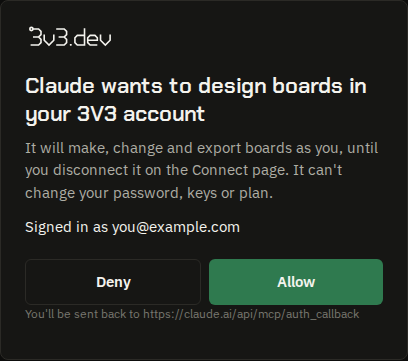
3V3's own page, in a window your app opens: it names the app and where it goes back to. - Refresh the MCPs panel; 3V3's tools are listed.
When it works
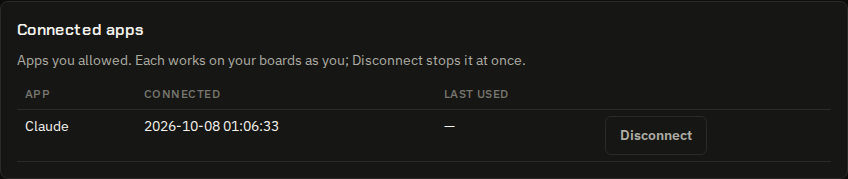
Your app lists 3V3's 74 tools — create_project, import_kicad_board, list_projects, list_groups, create_group, rename_group, move_board_to_group, get_routing_log and the rest — and your boards are on app.3v3.dev, where you can watch them change and take over at any time. The Connect page lists the app under Connected apps, where Disconnect stops it at once.
A first ask
Make a 50 × 50 mm board with an ESP32-C3, USB-C power and a status LED. Route it and stop when the check is clean.With a key instead
For a setup that can't sign in. Make a key on app.3v3.dev/connect (shown once).
Devin's page shows headers on a remote server:
{
  "mcpServers": {
    "v3": {
      "serverUrl": "https://mcp.3v3.dev",
      "headers": { "Authorization": "Bearer 3v3_dev_…" }
    }
  }
}
If it stops
What 3V3 says, word for word, and what to do.
| When | 3V3 says | Do this |
|---|---|---|
| Your app says it needs to sign in, or 401 | This endpoint needs your API key: send it as “Authorization: Bearer 3v3_dev_…”. Make one on the Connect an agent page (/connect). | An app that signs in does this for you: let it open 3V3's page. A script sends a key. |
| You disconnected the app | That app was disconnected from your 3V3 account. Connect it again to carry on. | Connect it again (the same steps); Disconnect on the Connect page did exactly this. |
| The sign-in ran out | That sign-in has expired; your app gets a new one on its own. | Normally the app refreshes it by itself. If it keeps saying so, sign in again from the app. |
| A revoked key | That key was revoked. Make a new one at POST /api/keys. | Make a new key on app.3v3.dev/connect and put it where the old one was. |
| Too fast | Slow down: this key has sent 120 messages in the last minute, and the limit is 120 a minute. Wait a minute and carry on. | Each key or app may send 120 messages a minute; wait a minute. |
| Too many boards today | This key has made 50 boards in the last 24 hours, and the limit is 50 a day. Carry on with one of them, or wait. | Each key or app may make 50 boards a day through MCP; your plan has its own monthly count too. |
| A wrong address | This address is 3V3's MCP endpoint: https://mcp.3v3.dev | Use the address exactly, with nothing after it. Opened in a browser it answers 405: it only speaks MCP. |
From Windsurf (Devin Desktop)'s own documentation, read on 8 October 2026; not yet tried with 3V3 by us. If a menu has moved, the page below is the one to trust.
- Devin Desktop FAQ (Windsurf became Devin Desktop on 2 June 2026)
- Cascade MCP Integration (Devin docs)
Checked 8 October 2026.